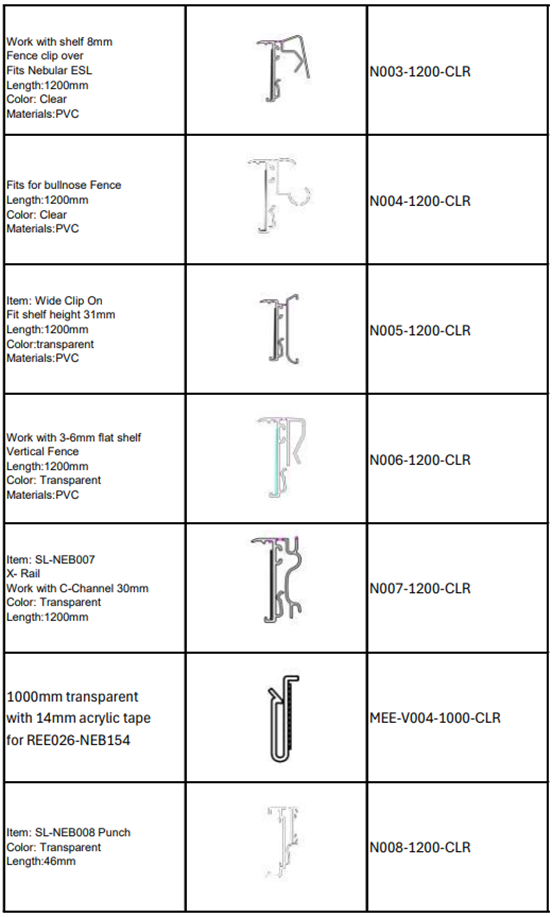
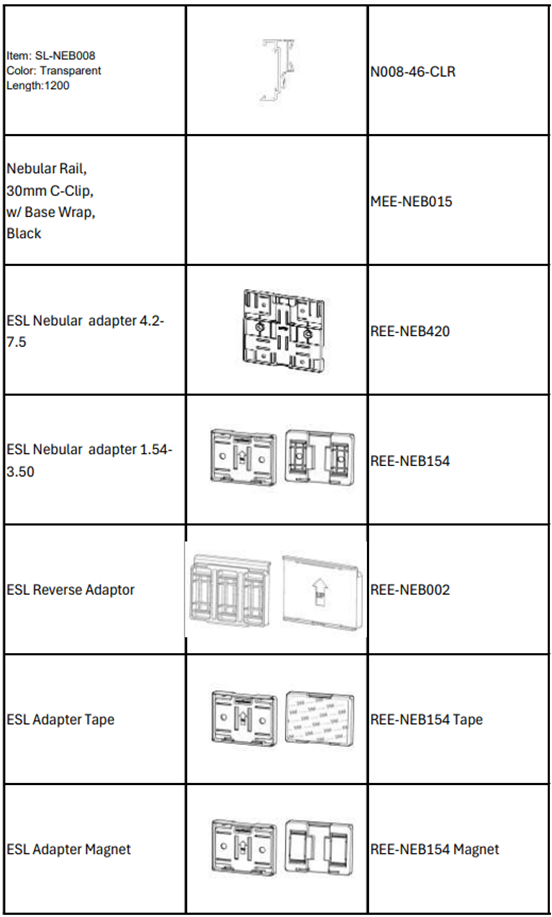
Appearance
Site Survey Manual
1. About this Document
This manual provides comprehensive instructions for conducting a Site Survey at a client location prior to Electronic Shelf Label (ESL) installation. It outlines the key activities necessary to ensure a smooth and efficient installation process.
2. Target Audience
This document is intended for the following groups:
Site Survey Team responsible for conducting the survey.
Store personnel supporting the survey.
SLS IT Team assisting with AP installation.
SLS Quality Control Team overseeing survey results.
3. Purpose of Site Survey
The primary goal of the Site Survey is to gather essential information to ensure an efficient installation, including:
Assessment of the store's physical layout.
Identification of potential challenges or areas needing special attention.
Evaluation of the existing infrastructure and environment.
Verification and counting of ESL rails and accessories required at each location.
Identification of areas needed for installation workspace.
4. Contact Information
For any questions or feedback regarding this manual, please contact:
sitesurvey@smartlabelsolutions.com
5. Glossary
| Term | Description |
|---|---|
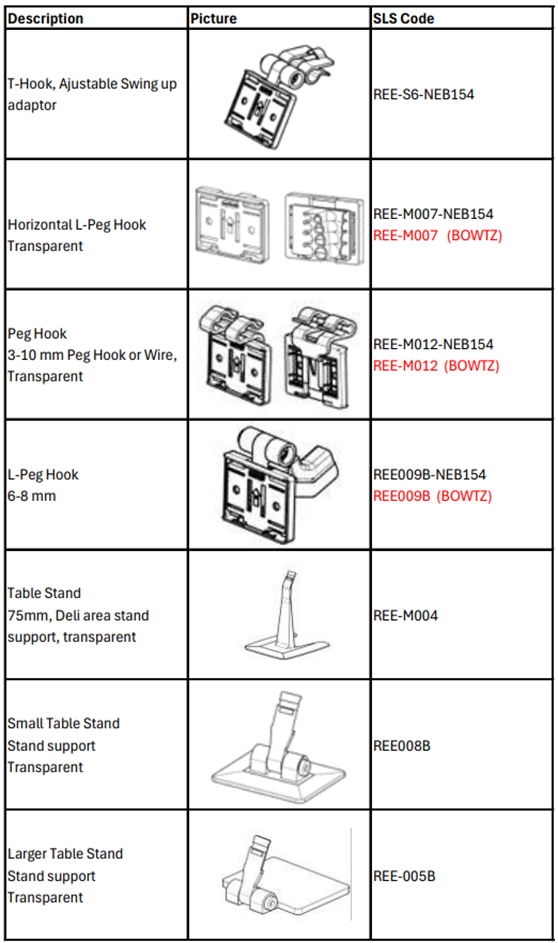
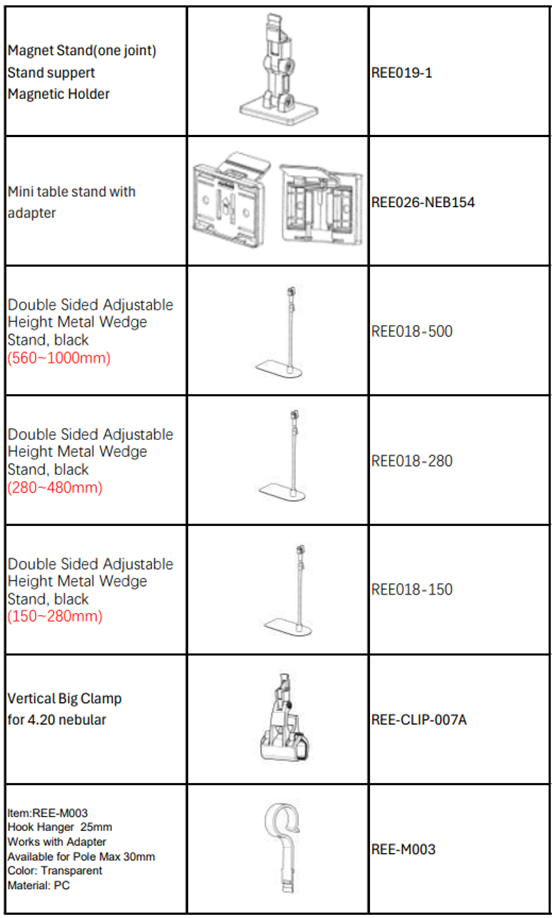
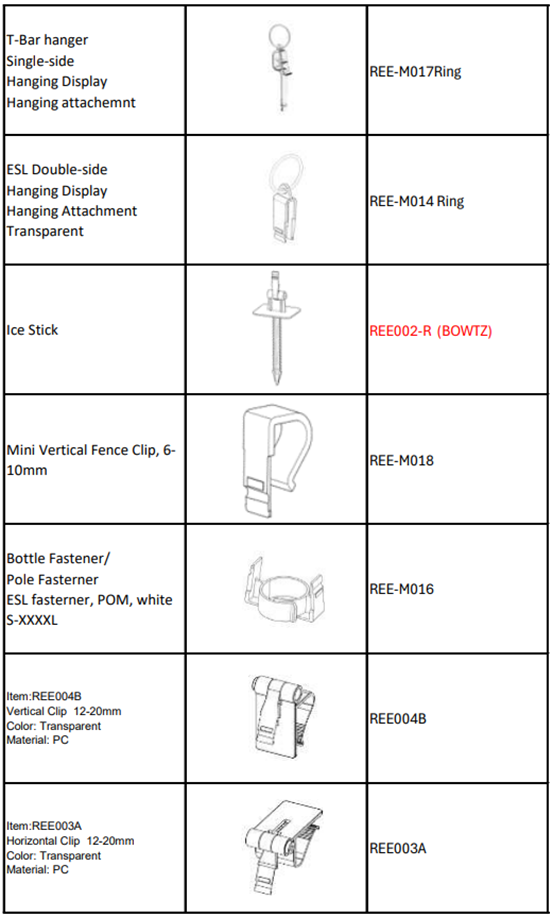
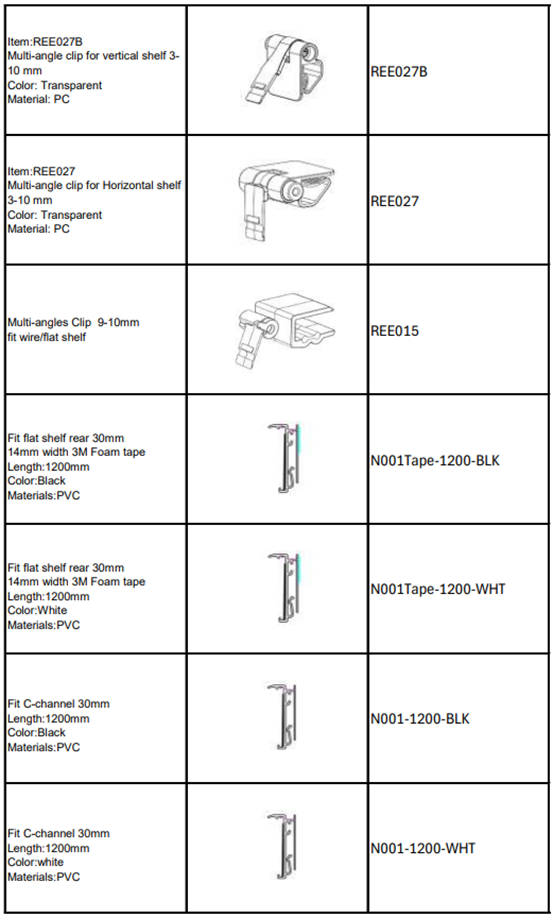
| Accessory | Hardware required for attaching ESL, including rails, adapters, and mounting equipment. For a complete accessory list, refer to the Accessory Book or visit slsaccessories.com. |
| Accessory Station | The designated area for retrieving ESL and accessories during installation. |
| AP (Access Point) | Device facilitating communication between ESLs and the server. |
| AP Map | Diagram showing the locations of existing or planned AP installations within the store. |
| Command Centre | The central point for coordinating tasks and managing orders during site installation. |
| CompanyCam | A photo annotation application used for documenting installation details at the store. |
| Cutting Corner | Designated area for performing special cuts on rails, typically located in the store’s warehouse. |
| ESL (Electronic Shelf Label) | Digital price labels installed on store shelves. |
| eTag | Alternative term for ESL. |
| Location ID | The unique identifier for a specific store location (e.g., rack, cooler, freezer) requiring ESL installation. |
| Nebular | A series of ESL products. |
| Nebular Pro | A series of ESL products. |
| PDA | Handheld device used for product association. |
| Product Association | The process of linking ESLs with products. Often referred to simply as "Association". |
| Resting Area | Designated space for installation workers to rest during installation. Should be adequately equipped to accommodate all workers. |
| Special Cut | Custom cuts required for rails that deviate from standard lengths (e.g., 1200mm, 890mm, 590mm). |
6. Site Survey Preparation
6.1 Gathering Necessary Information
Prior to visiting the client’s location, gather the following key information:
Updated floor plans with the latest revisions. Request floor plans with assigned Location IDs, if available.
Details about the types and quantities of shelves, coolers, freezers, and other store equipment.
Store address and operating hours.
Primary contact at the store for the site survey and installation.
Shipping details, including the receiving point and any loading dock information.
Information regarding after-hours access, particularly for stores situated in malls.
6.2 Pre-Site Survey Preparation
Before the site visit, ensure the following steps are completed:
Confirm the survey date with the client.
Clarify the scope of the installation.
Verify with the client if electric saws can be used inside the store.
Review the ESL size installation guidelines with the client.
Assign Location IDs on the floor plans (see Appendix 11.1 for guidelines). If feasible, the Site Survey Lead may visit the store beforehand to record Location IDs and finalize the floor plan.
Prepare the Site Survey Kit, including samples of various rail types and accessories (refer to the Site Survey Kit Checklist in Appendix 11.3).
Generate a new Site Survey Form to document the details of ESL and accessories to be installed.
Create a new project in CompanyCam for photo documentation.
6.3 Tools and Equipment Checklist
Ensure the following tools and equipment are available:
Measuring tape and vernier caliper (for measuring rail space).
Fully stocked Site Survey Kit.
Smartphone equipped with the CompanyCam app.
Pens, highlighters, and floor plans marked with Location IDs.
Company uniforms and ID badges.
AP Map for stores using Nebular ESL (third-generation tags).
7. Conducting Site Survey
7.1 Initial Store Assessment
Upon arrival at the store, complete the following:
Sign in as a visitor, if required.
Secure a shopping cart for the Site Survey Kit and tools.
Arrange for storage of personal belongings, if necessary.
Meet with the store manager or designated representative to discuss the project scope, identifying any specific requirements or constraints.
7.2 Layout and Floor Plan Analysis
Walk through the store to familiarize yourself with the layout, identifying key areas such as:
Entrance, customer service counter, restrooms, lifts, food courts, cashier stations, and self-checkout areas.
Note any architectural features that may impact AP communication, such as pillars, low ceilings, or large metallic structures.
Ensure the floor plan is accurate, marking any discrepancies or updates as needed. Align Location IDs with those assigned in-store.
Identify potential locations for the Command Centre, Accessory Station, Cutting Corner, and Resting Area.
For stores using Nebular ESL, designate areas for placing ESLs for pre-association.
7.3 Shelf and Equipment Analysis
Follow the floor plan to measure and count all shelves and equipment designated for installation.
Test various rail types to determine the optimal fit for each shelf, and record any special requirements using the vernier caliper.
Identify areas where Special Cutting is required and measure the custom dimensions.
Record the need for rail-related accessories (e.g., rail end caps, reverse adapters, angle blocks).
Evaluate non-shelf areas where rails or accessories may need to be installed, and propose configuration recommendations.
Identify areas requiring custom ESL fittings. If specific locations for various ESL sizes are not pre-determined by the client, make recommendations based on the following guidelines:
Freezers (below 0°C) for freezer-specific ESLs.
Promotional areas for larger ESLs.
Crowded areas for smaller ESLs.
Document areas containing unpackaged products (e.g., cakes, fruits, meat), as these require special handling during installation.
7.4 Special Notes on Conducting the Site Survey
Ensure that specific client requirements are noted during the site survey. Some examples include:
| Client | Specific Requirements |
|---|---|
| T&T | · Exclude bakery and kitchen areas · Install only freezers in the meat and seafood sections · Follow specific rail color-coding based on their Installation Standard · Use Reverse Adaptors and PDA Overturn function for ESL intended to be installed upside-down. |
| Sobeys | · No ESL are to be installed upside-down. Do not install Reverse Adaptors and there is no Overturn function in PDA app. |
8. Data Collection and Documentation
8.1 Site Survey Form
During the Site Survey, utilize the Site Survey Form to capture all essential data. This form should include the following key information:
Zone (e.g., produce, grocery, seafood)
Location ID
ESL type(s) to be installed
Accessory type(s) to be used
Special Cut requirements (if applicable)
Quantity of ESLs and accessories to be installed
Ensure that all measurements, observations, and relevant details are documented accurately. This data will be critical for post-survey analysis and installation planning.
A sample Site Survey Form can be accessed here: Site Survey Form (for SLS internal use only).
8.2 Photos and Measurements
Utilize the CompanyCam app to take detailed photos of each area surveyed. Pay special attention to:
Shelves, equipment, and other areas that may pose challenges during installation.
Mark Location IDs on each photo, along with the corresponding quantity of rails or accessories to be installed.
For rails, record dimensions if non-standard lengths (1200mm) are required.
Be sure to tag each photo with the relevant zone, location, and type of rail or accessory for easy reference.
9. Post-Site Survey Analysis
9.1 Data Review and Recommendations
Once the site survey is completed, review all collected data to identify any potential issues or areas that require further clarification. Key actions include:
Confirming installation recommendations with the client, particularly regarding rail types, ESL sizes, and accessories.
Verifying the accuracy of measurements, especially in areas requiring Special Cuts or custom fittings.
Reviewing any unique client requirements or store-specific challenges that may affect the installation process.
9.2 Reporting
A comprehensive Site Survey Report should be prepared, which includes the following:
A summary of the site survey findings, outlining any challenges or potential solutions.
Annotated floor plans with Location IDs and recommended installation configurations.
Detailed documentation of the types and quantities of ESLs, rails, and accessories required for each location, including a recommended spare quantity.
Supporting photographs of key areas, along with relevant annotations.
Recommendations for ensuring a smooth installation process.
The "Pre-Count" worksheet within the Site Survey Form can be used to generate a report detailing the quantities of ESLs and accessories to be installed at the store.
10. Conclusion
The Site Survey is an essential step in ensuring the successful installation of Electronic Shelf Labels (ESLs) at a client’s store. By adhering to the procedures outlined in this manual, the Site Survey team ensures that all relevant data is gathered, potential challenges are identified, and installation recommendations are accurately documented. A thorough Site Survey enables a smoother, more efficient installation process, minimizing potential disruptions during the execution phase.
11. Appendices
11.1 Guidelines for Assigning Location IDs on Floor Plans
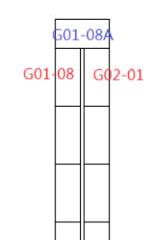
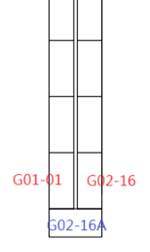
Location IDs follow a specific notation system, “Z99-99ZZ” for grocery areas and “Z99ZZ” for other store areas. The system is as follows:
- The first “Z” is a character representing the Zone Code. The common Zone Codes are
| Zones | Zone Codes |
|---|---|
| Bakery | B |
| Beer & Wine | W |
| Cashier | C |
| Diary & Frozen | D |
| Grocery | G |
| Kitchen (& Deli) | K |
| Meat | M |
| Produce | P |
| Seafood | S |
For grocery zones, the first two digits represent the aisle number. Ignore these two digits for other zones
The subsequent two digits represent the sequence of installation locations.
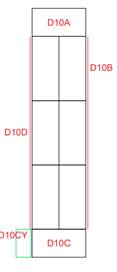
An optional character can be added to represent end caps or additional components.
For grocery end caps, the Location ID on the right-hand side, when facing the end cap, should be used as the reference. For island coolers or freezers, begin labeling with “A” at the top end cap, and proceed in a clockwise direction for subsequent components.
11.2 CompanyCam
CompanyCam is the online platform used for documenting the installation process with photos and annotations. To request access to CompanyCam, please contact:
sitesurvey@smartlabelsolutions.com.
Website: CompanyCam
11.3 Site Survey Kit Checklist