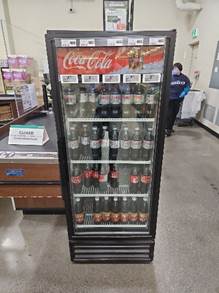
Appearance
Training Manual
1. About This Document
This Training Manual provides comprehensive instructions on installing Electronic Shelf Labels (ESL) on various accessories and how to operate PDAs for product association with ESLs.
2. Target Audience
This manual is designed for:
Installers responsible for installing ESLs at stores.
Store staff who manage price tags.
Store managers overseeing shelf layouts and overall operations.
3. Contact Information
For any inquiries or feedback regarding this manual, please contact:
installation@smartlabelsolutions.com
4. Introduction
4.1 What Are ESL?
Electronic Shelf Labels (ESL) are small digital displays used to show product prices and information directly on store shelves.
4.2 Why We Use ESL?
ESLs streamline price changes, enhance store organization, and ensure that customers see accurate and up-to-date pricing information.
4.3 What Are Fixtures?
ESL fixtures are hardware components that help mount ESLs to shelves or other equipment. Common ESL fixtures include rails, stands, clips, and hangers.
5. Before You Start
5.1 Required Materials
Measuring Tape: For measuring shelf lengths and aligning rails.
Rails: The tracks used to hold ESLs.
Other ESL Fixtures: For mounting ESLs on non-rail surfaces.
ESL: The digital labels to be installed.
Cleaning Supplies: For cleaning shelves before installation.
Scraper & Alcohol (75% Isopropyl): For removing adhesive residue from old rails.
ESL Removal Tool: For safely removing ESLs from rails or accessories.
PDA: For product association (pairing ESLs with products).
5.2 Installation Standards
Refer to the standards outlined in Section 10.1. These guidelines are based on extensive rollout experience and have been refined to ensure optimal performance and customer satisfaction.
Please note that while the provided Installation Standards offer a foundational guideline for ESL installation, each client or store may have unique requirements and constraints. It is strongly recommended that each client or store develop its own installation standards document to complement these best practices.
5.3 Training Videos
Training videos are available to supplement this document. Visit the following link to access the complete video playlist:
5.4 Important Safety Tips
Always wear gloves when installing or removing ESLs.
Exercise caution when using tools such as scrapers and alcohol.
6. Step-by-Step Guide to Mounting Rails
6.1 Understanding Rails
Rails are the tracks used to mount ESLs onto store shelves. They can be attached by slotting, clipping, or adhering them to the surface, depending on the rail type.
| Model | Name | Rail Code | Attachment Method |
|---|---|---|---|
| NEB001 | C-Channel | N001 | Slot In |
| NEB001Tape | C-Channel with Tape | N001-T | Adhesive |
| NEB003 | Fence Clip On | N003 | Clip On |
| NEB005 | Wide Clip On | N005 | Clip On |
| NEB006 | Flat board Clip On | N006 | Clip On |
| NEB007 | X-Rail | N007 | Slot In |
| NEB008 | Hook Rail | N008 | Slot in |
| NEB009 | Wide Fence Clip On | N009 | Clip On |
| NEB010 | Vertical Clip On | N010 | Clip On |
| MEE-V004 | Minimal Rails | MEE-V004 | Adhesive |
6.2 Removing Old Rails
For slot-in or clip-on rails, apply gentle pressure to remove the rails from the holders.
For adhesive rails, use a scraper and alcohol (75% isopropyl) to remove any leftover adhesive.
CAUTION: Ensure that food and beverages near installation areas are either removed or covered when applying alcohol.
Keep the old rails on the shelves or equipment for easy reference when attaching ESL. The old rails can be removed after verification.
6.3 Attaching Rails to Shelves
6.3.1 Slot in Rails
These rails slot directly into the existing holders on the shelf.
6.3.1.1 NEB001 C-Channel 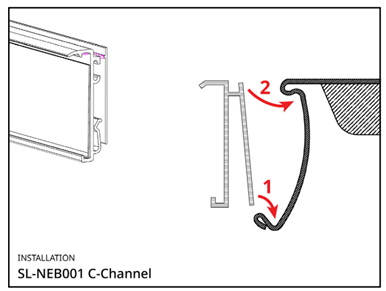 https://ESLFixtures.com/product/NEB001/ https://ESLFixtures.com/product/NEB001/ | 6.3.1.2 NEB007 X-Rail 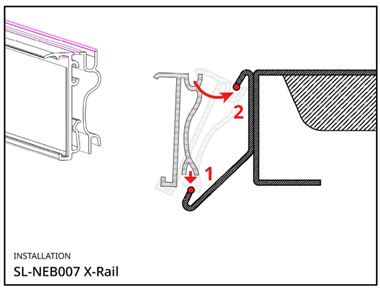 https://ESLFixtures.com/product/NEB007/ https://ESLFixtures.com/product/NEB007/ |
|---|
6.3.2 Clip On Rails
Rails that clip onto the edge of shelves or equipment.
6.3.2.1 NEB003 Fence Clip On 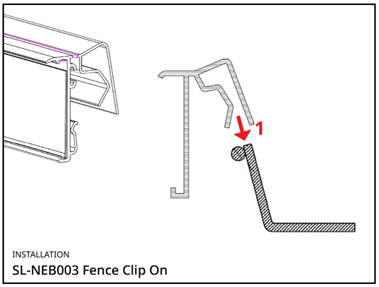 https://ESLFixtures.com/product/NEB003/ https://ESLFixtures.com/product/NEB003/ | 6.3.2.2 NEB005 Wide Clip On 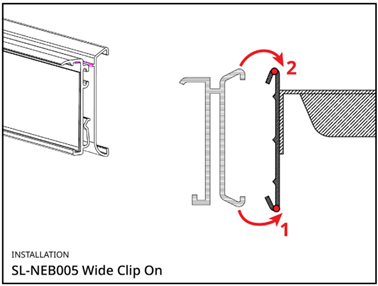 https://ESLFixtures.com/product/NEB005/ https://ESLFixtures.com/product/NEB005/ |
|---|---|
6.3.2.3 NEB006 Flat Board Clip On 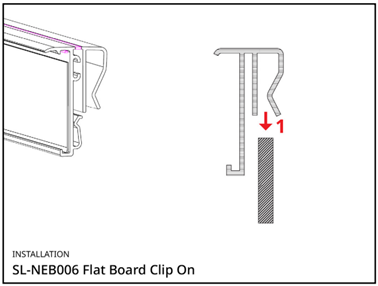 https://ESLFixtures.com/product/NEB006/ https://ESLFixtures.com/product/NEB006/ | 6.3.2.4 NEB010 Vertical Clip On 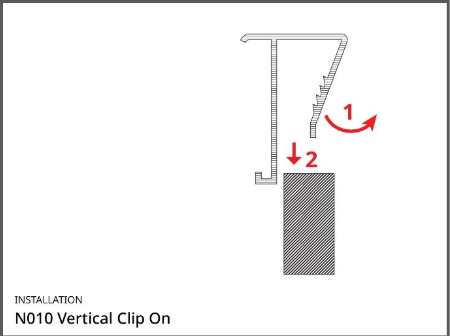 |
6.3.3 Adhesive Rails
Clean the surface, then peel and firmly press the rail onto the shelf. Avoid installing adhesive rails in areas exposed to moisture or heat.
6.3.3.1 NEB001Tape C-Channel with Tape 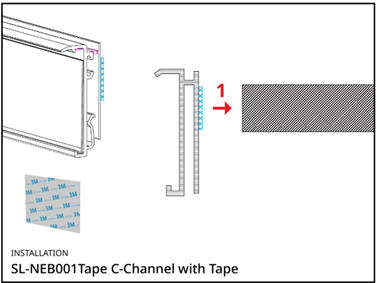 https://ESLFixtures.com/product/NEB001-tape/ https://ESLFixtures.com/product/NEB001-tape/ | 6.3.3.2 MEE-V004 Minimal Rail 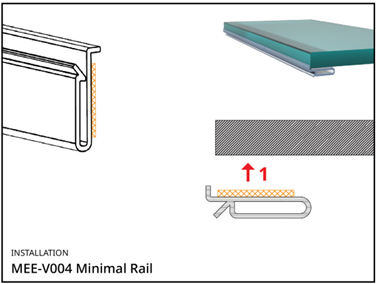 https://ESLFixtures.com/product/mee-v004/ https://ESLFixtures.com/product/mee-v004/ |
|---|
6.4 Ensuring Proper Alignment and Security
Use a Level: After attaching the rail, use a level to check that it is straight.
Adjust if Needed: If the rail isn’t straight, adjust it before securing it fully.
Test Rail: Gently pull the rail to ensure it is securely mounted.
6.5 Removing Rails
6.5.1 Slot in Rails
6.5.1.1 NEB001 C-Channel 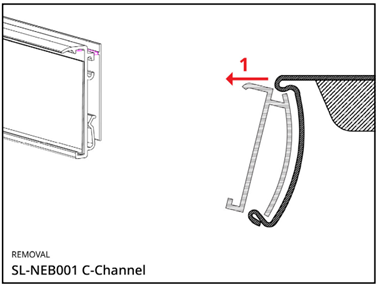 | 6.5.1.2 NEB007 X-Rail 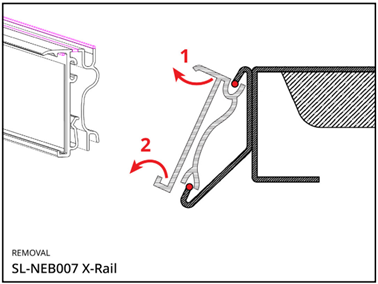 |
|---|
6.5.2 Clip On Rails
6.5.2.1 NEB003 Fence Clip On 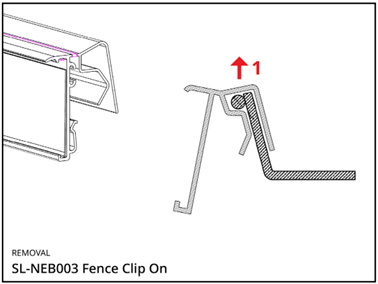 | 6.5.2.2 NEB005 Wide Clip On 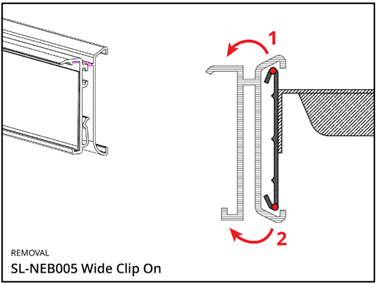 |
|---|---|
6.5.2.3 NEB006 Flat Board Clip On 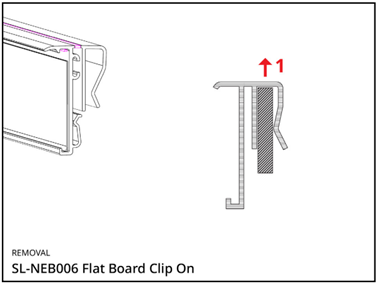 | 6.5.2.4 NEB010 Vertical Board Clip On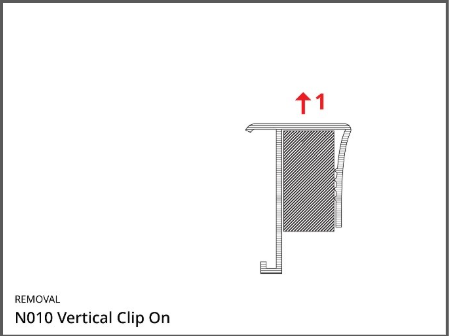 |
6.5.3 Adhesive Rails
Follow the same steps as outlined in Section 6.2 for removing adhesive rails..
7. Attaching ESL to Rails
7.1 Putting ESL on Rails
Insert the ESL into the rail from the bottom.
Apply pressure to the top until you hear a ‘click’, indicating the ESL is securely in place.
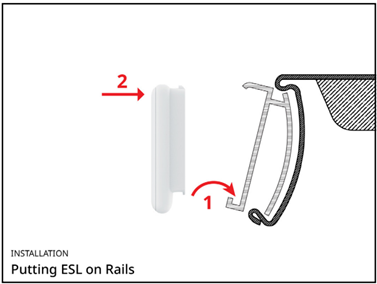
Link to video instructions – Installation on Rail
7.2 Verifying Security
Gently pull each ESL to ensure it is securely attached to the rail.
Check the ESL are properly aligned according to the Installation Standard.
7.3 Removing ESL from Rails
Note: Always use the ESL Removal Tool. Do not attempt to remove ESL with bare hands or other tools. It may cause damage to ESL or the rails, or even harm your hands.
Use the side with the two-pointed ends and slot them into the space between the rail and the top of the ESL.
Gently tilt the ESL Removal Tool to remove the ESL. Excessive force may damage the ESL or the rails.
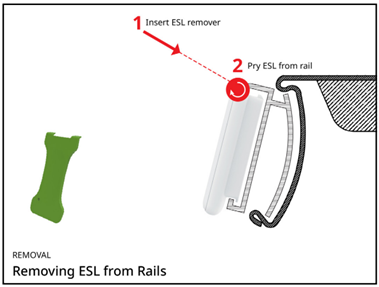
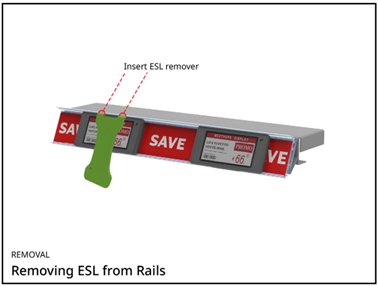
Link to video instructions – Remove from Rail
8. Attaching ESL to Other ESL Fixtures
ESL can be mounted using other accessories for specific positioning or placement requirements, e.g. on a flat table or on a basket.
For the full list of accessories, please visit http://www.etagaccessories.com.
8.1 Adapters
Adapters are used to mount ESLs onto various accessories such as stands or clips. Some adapters, like the REE-NEB154Tape and REE-NEB154Magnet, can be used directly on flat or metallic surfaces.
Reverse Adapters (REE-NEB002) are used only for ESL to be installed upside-down. Ensure the PDA supports the Overturn function before using Reverse Adapters.
8.1.1 Mounting ESL on Small Adapter (REE-NEB154)
Note the direction of the arrow on the Small Adapter. It should be pointing to the same direction as the top of ESL to be mounted.
Insert the ESL into the rail from the bottom.
Apply pressure to the top until you hear a ‘click’, indicating the ESL is securely in place.
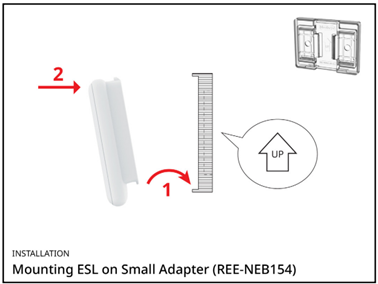
Link to video instructions – Small Adapters
8.1.2 Mounting ESL on Big Adapter (REE-NEB420)
Note: REE-NEB420 Adapter is used for ESL with size 4.20” or above.
Insert the ESL into the rail from the bottom as illustrated.
Apply pressure to the top until you hear a ‘click’, indicating the ESL is securely in place.
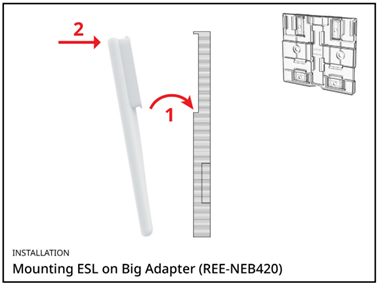
Link to video instructions – Big Adapters
8.2 Mounting ESL Fixture to Adapter
Most accessories, including stands, clips, and bottle fasteners, can be attached to Adapters as illustrated in the following diagrams.
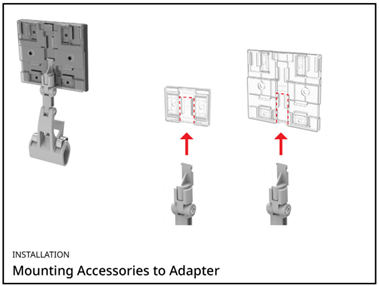
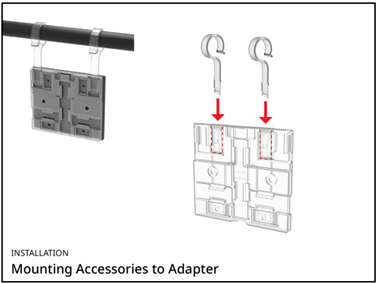
The Big Adapter (REE-NEB420) also supports mounting hangers.
8.3 Mounting Adapters to Stands, Clips, Peg Hooks and other Accessories
8.3.1 Table Stands
Table Stands are used on flat surfaces, usually on the eyesight level. Magnetic Stands can be used on metal surfaces.
Mount ESL to the Adapter
Mount the Table Stand to the Adapter
Adjust the angle of the Table Stand
Applicable to Larger Table Stands (REE005B), Small Table Stands (REE008B), Table Stands (REE-M004), Magnetic Stands (REE019 and REE019-1) and Stands (REE-M002).
Link to video instructions – Table Stand Installation
8.3.2 Pole Stands
Pole Stands are usually used for promotion items. With adjustable height, they can be placed on tables or the floor. Most Pole Stands can hold two ESL and work better with larger ESL sizes (4.20” or above).
Mount the pole to the base
Adjust the height of the pole
Mount ESL(s) to the pole
Applicable to Single-sided Metal Stands (REE006B-280-PAT028), Double-sided Metal Stands (REE010-450-PAT019), Aluminium Double-sided Holders (REE011-PAT019), and Double-sided Floor Stands (REE012-500-PAT019 and REE012-PAT019).
Link to video instructions – Pole Stand Installation
8.3.3 Clips
There are two categories of Clips – Horizontal and Vertical. They can be used on horizontal or vertical shelves, baskets, pipes, and cardboard.
Mount ESL to the Adapter
Mount the Clip to the Adapter
Adjust the angle to the Clip
Applicable to Horizontal Clips (REE003A-NEB154), Multi-angles Clips (REE015-NEB154, REE026-NEB154, REE027-NEB154 and REE027B-NEB154), Vertical Clips (REE04B-NEB154 and REE-M018), Ice Pins (REE002-R), Clamps (REE-CLIP-007A, REE-CLIP-007A-1 and REE-CLIP-007B-2) and Bottle Fasteners (REE-M016).
Link to video instructions – Vertical Clip Installation
8.3.4 Peg Hooks
Peg Hooks are generally used on shelves with hook bars or display hooks. They are ready for mounting ESL and do not require further installation.
- Mount ESL to the Peg Hook
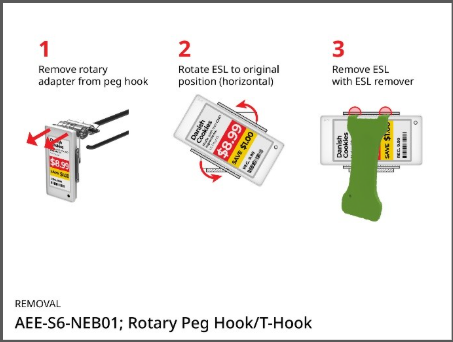
Applicable to T-Hooks (REE-S6-NEB154, REE-S8-NEB154, REE024-S6-NEB154, REE021-S5-NEB154, REE-M012-NEB154, MEE-2310-T and MEE-2310-U) and L-Peg Hooks (REE009B-NEB154, REE-M007-NEB154 and REE029-NEB154).
Link to video instructions – T-hook Installation
8.3.5 Hanging Support
Hanging Support accessories are used for areas above eyesight level, usually with hangers from the ceiling.
Only Big Adapters (REE-NEB420) should be used for Hanging Support accessories.
Mount the Hanging Support accessories to the Adapter
Hang the ESL to the hangers
Applicable to Hanging Attachment (REE-M013, REE-M014 Ring, MEE-M017 Ring and REE-M003)
Link to video instructions – Hanging Support Installation
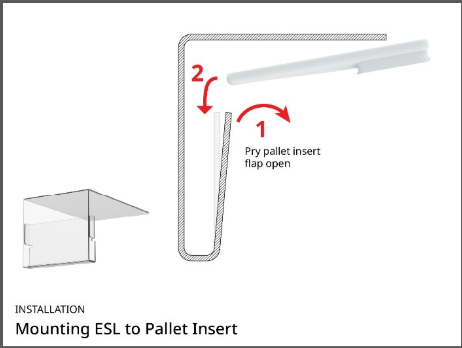
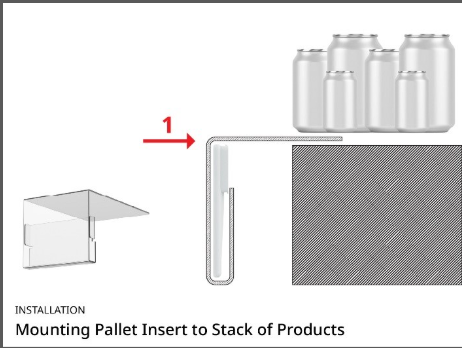
8.3.6 Pallet Inserts
Pallet Inserts are designed for stacking areas where rails or hanging support fixtures cannot be installed. They are intended for use with larger ESL sizes, specifically 4.20" and above.
8.3.7 Rotary Adapters
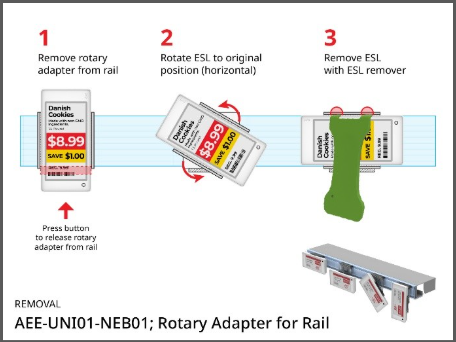
Rotary Adapters are used when an ESL needs to be displayed in a vertical orientation. These adapters allow the ESL to be rotated by 90 degrees.
8.3.7.1 AEE-UNI01-NEB01 Rotary Adapter for Rail
8.3.7.1 AEE-UNI01-NEB01 Rotary Adapter for Rail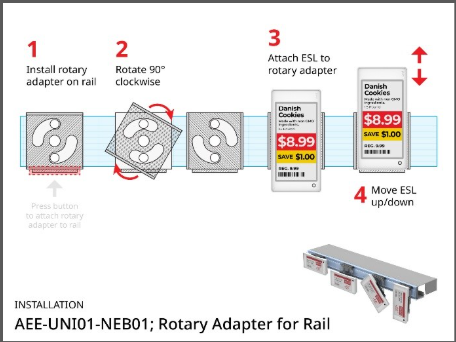 | 8.3.7.2 AEE-UNI01-NEB01 Rotary Adapter for Rail 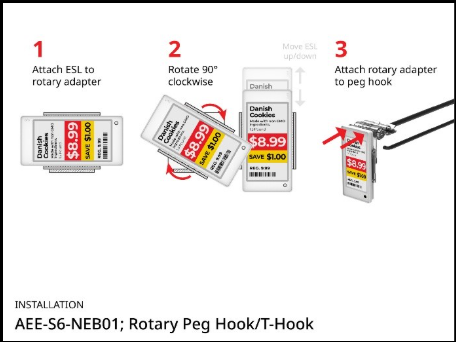 |
|---|
8.3.8 ESL Protective Cases
ESL Protective Cases are designed to protect ESLs from physical impact and potential damage, such as contact with shopping carts or other store equipment.
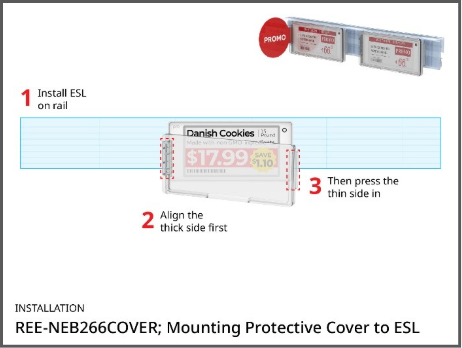 | 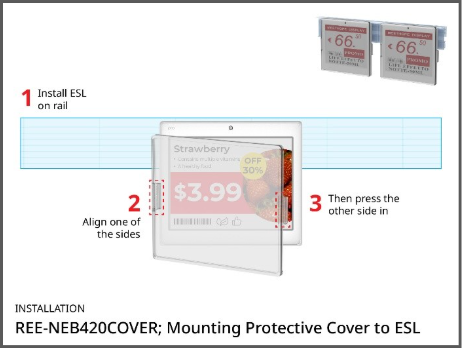 |
|---|
8.4 Removing ESL from ESL Fixtures
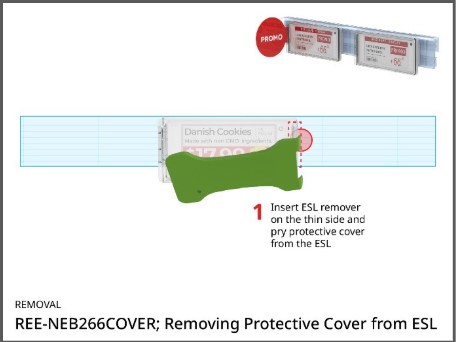
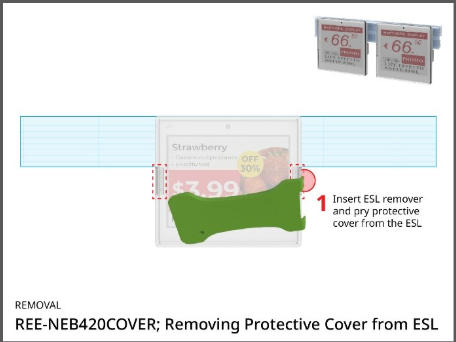
Note: Always use the ESL Removal Tool. Do not attempt to remove ESL with bare hands or other tools. It may cause damage to ESL or the adapter, or even harm your hands.
8.4.1 Removing ESL from Adapters
Press the tip of the accessory to remove it from the Adapter
Use the side with the two-pointed ends and slot them into the space between the adapter and the top of the ESL.
Gently tilt the ESL Removal Tool to remove the ESL.
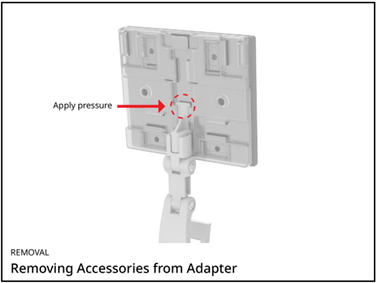
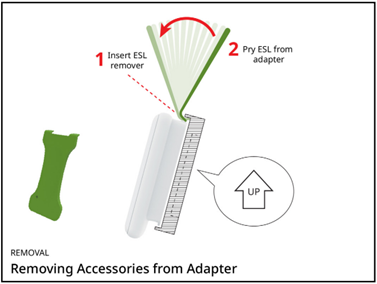
Link to video instructions – Removing from Adapter
8.4.2 Removing ESL from Rotary Adapters
 |  |
|---|
8.4.3 Removing ESL from Rotary Adapters
 |  |
|---|
9. Installing Other Accessories
9.1 Angle Blocks
Lift up the rail gently.
Slot one side of the Angle Block into the back of the rail as illustrated. Make sure it is securely installed into the holder.
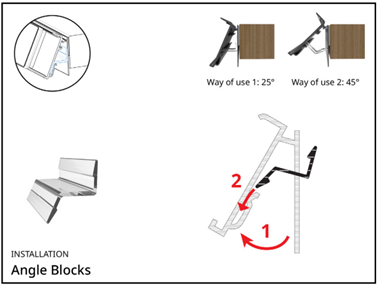
Note: Angle Block supports two Ways of Use for different angles. Ensure all the Angle Blocks on the same rail are installed consistently.
Link to video instructions – Angle Block Installation
9.2 Rail End Caps
- Insert end caps firmly into the rail slots, as illustrated below, to provide a clean, finished look and prevent hazards.
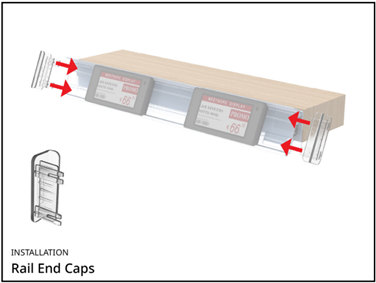
Link to video instructions – Rail End Cap Installation
10. Product Association
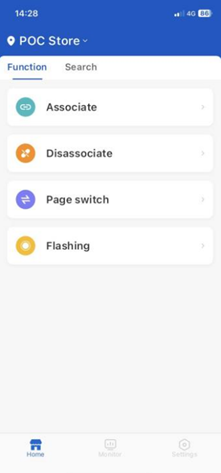
To display product and pricing information on the ESL, use the Handy Link application on the PDA to associate the ESL with the corresponding products.
Note: Handy Link can be customized according to the client’s specific needs. As a result, the features and interface of the app you are using may differ from what is described in this document.
10.1 Basic Functions
10.1.1 Associate / Sign Assign
- To link an ESL with a product (also referred to as an “Article”), select Associate or Single Assign on the home screen.

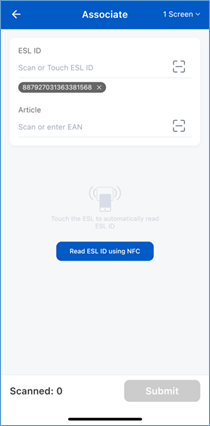
- In the ESL ID field, enter the ESL’s unique ID. The ESL ID can be located either on the screen or at the bottom of the ESL. You can input the ID in one of the following ways:
o Scan the ESL barcode
o Manually enter the ESL ID
o If NFC is enabled, tap the PDA with the ESL to retrieve the ID
- In the Article field, enter the product’s ID by either:
o Scanning the product’s barcode
o Manually enter the product ID
For items sold by weight, special item codes may be required. Do not scan the barcode on the product package in such cases. If unsure, consult the store manager or installation team.
Some versions of Handy Link may include an Overturn feature, which is used for ESLs installed upside-down. If this feature is not visible, it means it is not enabled.
Once you have entered the Article ID, click Submit. A message confirming “Operation successful” will appear once the association is complete.
The ESL may take a few moments to display the newly associated product information.
10.1.2 Disassociate / Unassign
- To remove the product or pricing information from an ESL, use the Disassociate or Unassign feature. Once disassociated, the ESL will display a blank screen.
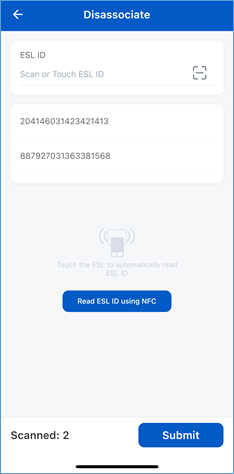
- To disassociate, follow these steps:
o Select Disassociate or Unassign on the home screen.
o In the ESL ID field, input the ESL ID using one of the following methods:
§ Scan the ESL barcode located at the bottom of the ESL
§ Manually enter the ESL barcode
§ If NFC is enabled, tap the PDA with the ESL to retrieve the ID
o Click Submit. It may take a few seconds for the ESL to clear the displayed information.
10.2 Other Functions
Additional functions in the Handy Link app may be customized to meet specific client needs. Please consult the IT team or installation team for guidance on using these features.
10.3 Troubleshooting
For any issues encountered while using Handy Link or the PDA, please contact the IT team for assistance.
11. Common Problems
- How can I identify the size of ESL?
The ESL size is indicated in the model number, typically found at the back of the ESL. For example, in the model number, "290" signifies that the ESL is 2.90 inches in size.
- Which type of ESL should be used in freezers?
Only ESLs with a blue casing are designed to for freezer environments (below 0° C). ESLs with a white casing must not be used in freezing conditions.
- How can I identify the top side of an ESL?
- The top side of an ESL can be identified in two ways:
- The barcode is generally positioned at the bottom of the ESL, making the opposite side the top.
- Alternatively, when the text printed on the back of the ESL is upright and readable, the upper edge corresponds to the top side.
- What are the standard rail measurements ?
For N001 rails, the common rail lengths are 1200mm (4 ft), 890mm (3 ft) and 590mm (2 ft).
For other rail models, the common rail length is 1200mm only.
However, rail sizes may also be customized to suit specific installation requirements.
- What rail colours options are available?
The most common rail colours are black, white and transparent (semi-transparent).
- When should each rail colour be used?
Rail colour requirements may vary by client and store standards. Please confirm the appropriate rail colour with the installation team or store manager prior to installation.
Can fixtures be used in freezers?
Yes, all fixtures are freezer-compatible except for taped rails and taped adapters. Taped fixtures are not recommended for freezer environments, as moisture may reduce the adhesive effectiveness over time.
Which adapters should be used for different ESL sizes?
- There are four adapter groups available: REE-NEB154, REE-NEB420, REE-NEB002 and AEE-UNI01.
- REE-NEB154 - Recommended for ESL size 4.20" and below
- REE-NEB420 - Recommended for ESL size 4.20" and above
- REE-NEB002 - Recommended for ESL size 4.20" and below when installed in reverse orientation only
- AEE-UNI01 - Recommended for ESL size 2.66" and below when installed in vertical orientation only
- Where can I find additional information about ESL fixtures?
Additional details regarding ESL fixtures can be found at: https://eslfixtures.com.
- How long does it take for an ESL to display product and price information after product association?
Following product association, the ESL typically updates within 30 seconds to 3 minutes. The actual update time may vary depending on the ESL model, AP signal strength and the refresh frequency configured on the AP.
12. Appendices
12.1 Installation Standards
12.1.1 Use of ESL
While each client or store may install different sizes of ESL based on specific conditions, the following guidelines are recommended for optimal customer experience.
2.66” and 2.90” labels are suitable for general products.
1.54” and 2.13” labels are recommended for densely stocked areas. A 1200mm (4ft) rail can hold up to thirteen 2.90” or fifteen 2.66” labels. If more items are displayed, smaller ESL sizes should be used.
4.20” or larger labels should be used for promotion products.
Freezer ESLs (with a blue casing) are for use in freezers or coolers where the temperature is below 0°C. It is essential to use these in such conditions, as regular ESLs (with a white casing) may become damaged.
12.1.2 ESL Alignment
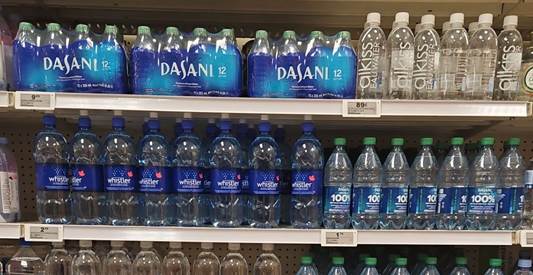
- ESLs should be aligned to the left side of the corresponding product.
12.1.3 Rail Alignment
- Rails should be centered on the shelving unit or equipment.
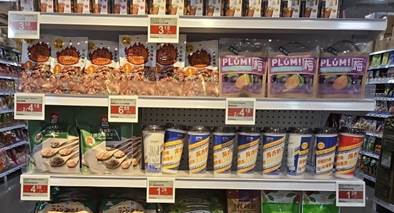
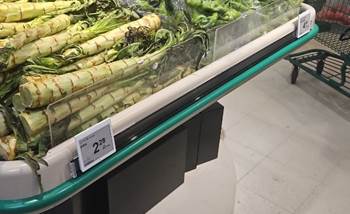
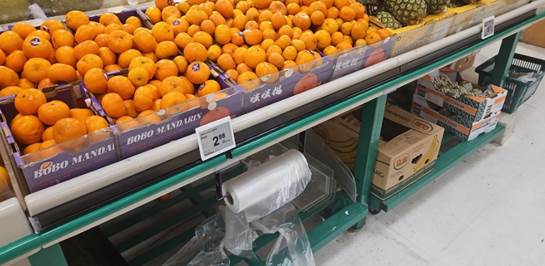
- When multiple rails are installed next to each other, they should be aligned horizontally to create the appearance of a single, continuous rail.
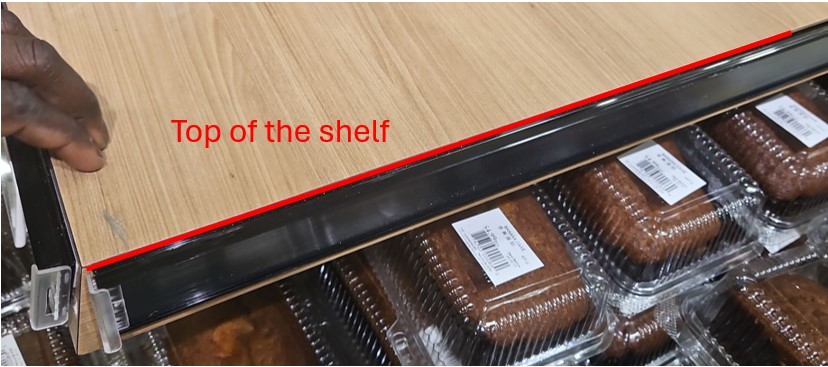
- For table shelves using adhesive rails, the rails should align with the top of the shelf.
12.1.4 Rail Length
- For equipment with multiple components, the rail length should match the length of the component it is attached to.

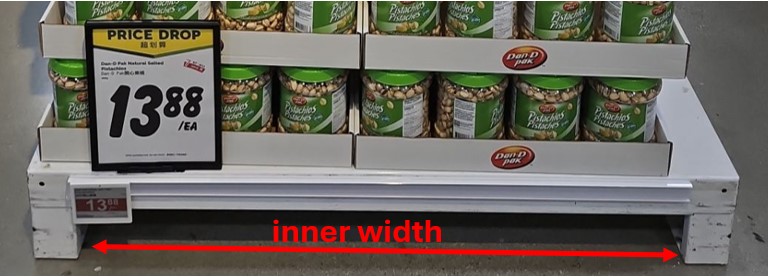
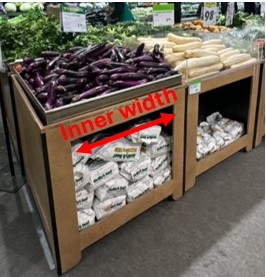
- For tables or stands requiring adhesive rails, the rail length should match the inner width of the table or stand.
12.1.5 Use of Rail End Caps
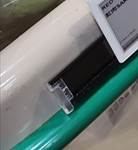
- Rail end caps should be installed on rails to prevent potential hazards where people may come into contact with exposed edges.
12.1.6 Others
Use Table Stands on surfaces exposed to heat or warmth.
For open-door fridges (e.g. soda displays), use double-side adhesive rails. The rails should be installed just below the soda drink banner.